
Upon opening the TCGplayer app for the first time, you are presented with a straightforward camera viewfinder featuring a single button.
The app immediately requests camera permissions; once granted, you are taken directly to the scanning interface.
There are no tutorial pop-ups or onboarding walkthroughs to interrupt the flow.
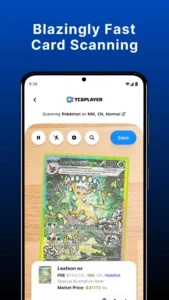
The viewfinder displays a live camera feed with a card-shaped outline.
Placing a Magic: The Gathering card in front of the lens quickly initiates the recognition process.
The app displays:
-
the card’s name,
-
set,
-
and current market price within two seconds—a speed that stands out as the app’s greatest strength.
However, the experience varies significantly depending on lighting conditions and the reflectivity of the card’s surface.
Holographic foils often confuse the recognition algorithm.
The app occasionally selects the incorrect set when the same artwork appears across different printings—a known limitation that TCGplayer acknowledges in its support documentation.
Scanning Performance and Best Practices
The scanner performs best when the card is placed against a white background at a 45-degree angle.
Users who follow these guidelines report a success rate of over 90 percent, whereas those who do not often abandon the app after a few failed attempts.
If a scan fails, the app does not provide real-time feedback explaining the issue; it simply displays a “no card detected” message.
This lack of detailed information can be frustrating for new users, though experienced collectors often refine their technique through trial and error.
The scanning engine received a major update in late 2025 that improved the recognition of holographic cards, while Version 5.0 enhanced the camera’s focus and exposure controls.
These improvements certainly mitigated the issue but did not eliminate it entirely.
Collection Management and Active Lists
Scanning a card does more than just identify it; the app automatically adds every scanned card to an active list.
This list serves as a temporary holding area from which users can save items to their permanent collection.
A logged-in account is required to save items; users without an account cannot permanently preserve their scans.
While the app stores lists locally on the device, these local lists are lost if the phone is changed or the app data is cleared.
This poses a significant risk for users who scan large collections without creating an account.
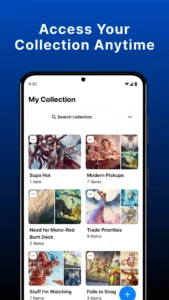
The app’s collection management feature allows users to organize cards into folders.
Folders can be:
-
named,
-
renamed,
-
duplicated,
-
and shared.
Sharing a list generates a text-based export that can be sent via email or messaging apps.
This export includes:
-
card names,
-
sets,
-
quantities,
-
and market prices—functionality that is particularly useful for traders wishing to share their inventory with potential buyers.
CSV Export and Seller Portal Integration
The collection management system also supports CSV export.
The export follows specific settings to ensure consistent field ordering, which is crucial for sellers who want to import their collection data into other tools.
The app’s integration with the seller portal marks a key difference compared to standalone scanner apps.
Level 4 sellers can import scanned lists directly into their seller portal inventory, effectively bridging the gap between collection tracking and sales.
This process involves tapping the ellipses on the list thumbnail and selecting “Import to Seller Portal,” followed by a confirmation message upon successful upload.
However, this workflow is unavailable to lower-level sellers, limiting its utility for casual users.
Price Tracking and Market Data
The app pulls pricing data directly from the TCGplayer marketplace.
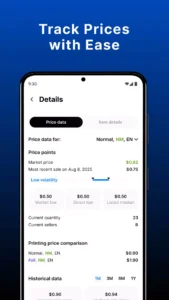
The “Market Price” reflects actual sales activity derived from thousands of daily transactions involving numerous individual sellers; it is not a speculative figure but a data-driven estimate based on completed sales.
The app also displays the “Listed Median” and “Most Recent Sale” for each card.
Together, these three data points provide users with a comprehensive view of a card’s current value.
Pricing data is updated in real-time, meaning the current market price appears the moment a card is scanned.
This instant price display is one of the app’s strongest features.
Collectors can visit a card shop, scan a card, and determine its market value in seconds.
This capability has made the app indispensable for many serious collectors.
Supported Games and Regional Pricing
The app supports price tracking for every game available on the TCGplayer marketplace.
The list of supported games includes over 40 titles, ranging from major franchises like Magic: The Gathering and Pokémon to niche games such as Dragoborne and WIXOSS.
The breadth of this database is unmatched.
The latest update also allows users to scan CookieRun: Braverse cards.
The app keeps users up-to-date with the emergence of new trading card games, although its pricing data is primarily US-centric.
International users have noted that prices do not reflect their local markets; the app offers neither currency conversion nor region-specific pricing adjustments.
Device Performance and Accessibility
In real-world scenarios, the app’s performance varies significantly.
Users with modern flagship phones report smooth operation and fast scan times, whereas those with older devices often experience lag and occasional crashes.
The app requires Android 9.0 or higher, a minimum requirement that excludes a large number of older devices.
The app’s file size has increased substantially in recent versions; the APK exceeds 160 MB, consuming a significant amount of storage space.
It also requests access to the device’s camera—necessary for scanning—but the permission prompt appears without explanation.
Users who deny camera access cannot utilize the app’s core functionality.
Furthermore, the app offers no manual entry alternative for users who cannot or do not wish to use the camera, which is a major drawback for users with accessibility needs.
Ordering and Customer Support
Placing orders through the app presents its own set of challenges.
Users frequently report order cancellations and issues with refunds, and the checkout process involves navigating through multiple screens.
International users face additional hurdles regarding customer service; the app routes inquiries through a chatbot before connecting users to a human agent, creating friction for those requiring immediate assistance.
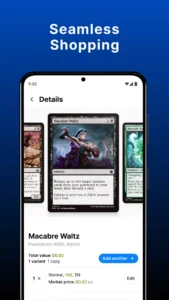
Essentially, the app’s shopping feature is merely a mobile wrapper for the TCGplayer marketplace, offering no capabilities beyond those available on the mobile website.
The app’s primary value lies in its scanning and collection management capabilities, not in its shopping features.
Occasional misidentification by the scanner—particularly with cards featuring repeated artwork—forces users to make manual corrections.
This manual correction process is time-consuming and undermines the speed advantage the app offers.